
Album Picker Bar
PRO Free: 50-time trial limit.
The album picker bar appears at the bottom of the Viewer when you organize photos — for example when adding to an album or moving photos from the Tray.
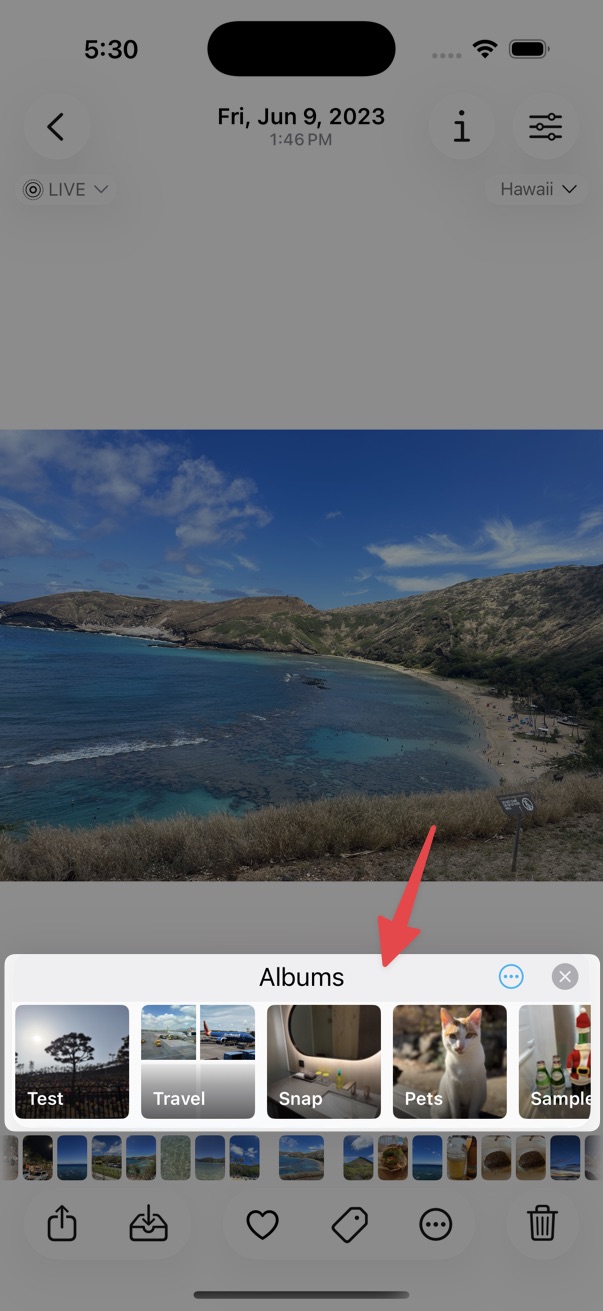
Show or Hide Album Bar
Toggle the album picker bar on or off from the viewer:
From the toolbar
- Tap the on the bottom toolbar.
- Choose Options.
- Tap Show/Hide Album Bar.
From album titles
Tap the album names at the top of the viewer — or Add To if the photo is not assigned to an album yet — then tap Show/Hide Album Bar.
Album Names must be enabled in Settings > Viewer for the album title shortcut to appear.
Pinned albums
Pin frequently used destination albums for one-tap access. Manage pinned albums in Settings > Sidebar.
Recent albums
Recently used destination albums appear in the recents list so you can move photos quickly without browsing the full album tree.
Album cover image
Choose whether an album in the bar shows the Key Photo or the Last Added Photo as its cover image.